
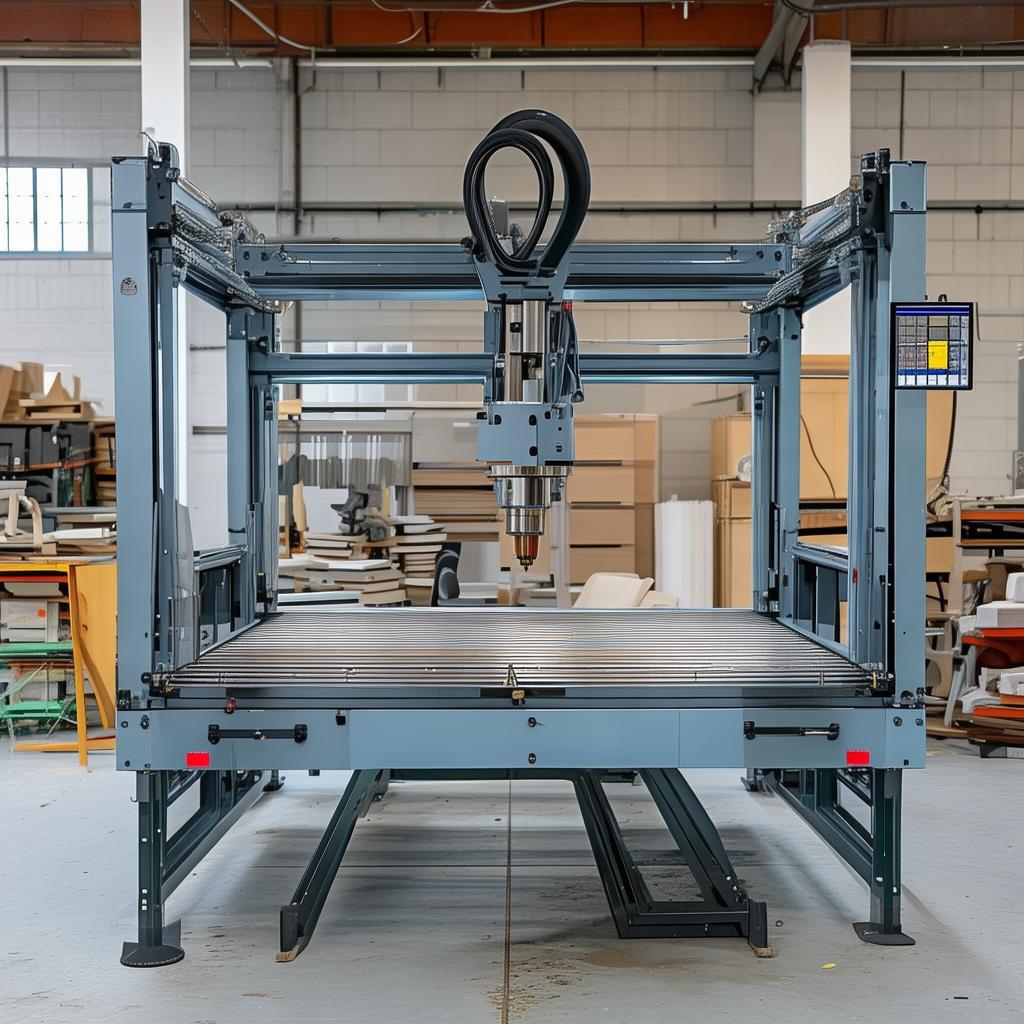
CNC router for architectural models
Product Overview
A CNC router for architectural models is a computer-controlled woodworking and composite cutting system designed for precision fabrication of scaled structures, facade panels, and detailed model elements. Built for architects, model makers, and fabrication shops in the AEC and display industries, this router helps teams convert CAD/BIM drawings into clean, repeatable parts with consistent edges and accurate contours. From concept massing studies to presentation-ready architectural dioramas, a CNC router streamlines production, reduces manual rework, and supports efficient batch manufacturing.
If your workflow depends on accurate geometry, tight part fit, and dependable routing across common model materials, a dedicated CNC platform provides the production control you need—without forcing your team to learn complex manual processes.
Key Features
- Architectural-level accuracy: Stable positioning and controlled toolpaths support faithful reproduction of drawings, elevations, and relief details.
- Clean finishing for model-ready parts: Optimized routing paths help deliver crisp edges and smoother surfaces for presentation use.
- Material versatility: Handles common fabrication materials used in prototypes and architectural displays, enabling one platform for multiple project types.
- Faster iteration cycles: Move from design updates to physical outputs quickly, minimizing downtime between revisions.
- Repeatable production: Program once, reproduce consistently for client approvals, sales models, or multi-unit installations.
- Shop-friendly workflow: A practical operating approach supports busy studios and production floors where reliability matters more than experimentation.
- Integration with CAD-to-CAM: Smooth handoff from design files to toolpaths helps maintain geometry across the process chain.
Technical Specifications
| Parameter | Specification |
|---|---|
| Machine Type | 3-axis CNC router for CAD/CAM-based cutting, trimming, and routing |
| Working Area | Configurable to suit model panel sizes and production layouts |
| Spindle / Tool Compatibility | Supports standard CNC tooling for routing and engraving workflows |
| Drive & Motion | Precision motor control for stable toolpath execution |
| Control Interface | Computer-controlled motion with CAM workflow support |
| Repeatability Approach | Designed for consistent reruns using saved programs and tooling parameters |
| Materials & Use | Suitable for typical architectural model fabrication materials (with proper tooling selection) |
| Cooling / Dust Handling | Built for shop conditions; configure extraction and maintenance based on material |
Note: Working area, spindle options, and peripheral setup are typically selected based on your maximum part dimensions and material mix. Share your CAD samples and material list for an exact configuration proposal.
Application Scenarios
- Facade and panel prototyping: Route scaled facade segments and relief textures for walkthrough and client approval sets.
- Terrain and landscape elements: Produce layered base plates, contours, and cutouts with consistent geometry across revisions.
- Interior and detail assemblies: Create window frames, mullions, and thin components with repeatable toolpath results for assembly.
- Retail and exhibition displays: Fabricate signage backings, modular displays, and demo stands using stable cutting workflows.
- Batch production for sales teams: Repeat model part sets for multiple territories using saved CAM programs.
Advantages
This platform is engineered around real AEC model fabrication needs—where accuracy, finish quality, and schedule reliability matter as much as raw cutting power.
- Less rework, fewer fitting issues: Precise toolpath execution supports better part-to-part alignment for assembled model sets.
- Designed for design iteration: When clients request changes, you can regenerate parts quickly with consistent results rather than rebuilding by hand.
- More predictable finishing outcomes: Routing strategies and stable mechanics help produce surfaces that are easier to sand, paint, or assemble.
- Better throughput for studios: Compared with general-purpose hobby CNC setups, an architectural-focused configuration reduces bottlenecks in daily production.
- Confident scaling from prototypes to batches: Use the same CAM workflow to move from one-off models to repeatable part families.
If you’re evaluating a general router, upgrading to a dedicated woodworking/CAD-CAM workflow for architectural outputs can materially improve both quality and consistency—key differentiators when deadlines are tight.
Why Choose Us
We support international buyers with a procurement-minded approach: configuration guidance, clear documentation, and responsive communication through commissioning and early production.
- Application-first recommendations: We help select a machine layout that matches your model size, material mix, and tool strategy.
- Commissioning and ramp-up support: Guidance for first job setup to reduce time-to-first-part.
- Clear after-sales communication: Straightforward channels for troubleshooting, spare parts, and operational questions.
- Global shipping coordination: Packaging and delivery planning designed for cross-border supply chains.
- Longevity mindset: We focus on maintainability and practical operation—important for daily studio uptime.
If you share your intended materials, expected part dimensions, and target finish level, we can outline a recommended configuration for your architectural modeling pipeline (including CAM workflow compatibility).
FAQ
1) What materials can this type of router handle for architectural models?
It’s typically used for common fabrication materials used in architectural model production. Exact compatibility depends on your tooling and cutting strategy—share your material list and we’ll recommend the best approach.
2) Can the workflow integrate with my existing CAD/CAM process?
Yes. The router is designed around standard CAD-to-CAM practices used in AEC and model-making workflows, helping you translate drawings into toolpaths with fewer manual steps.
3) Is a CNC router suitable for both prototypes and batch production?
Absolutely. Once you finalize your CAM programs and tooling parameters, you can reuse them to reproduce consistent parts—ideal for multiple client approvals or repeated sales model sets.
4) How do I choose the right working area for my architectural modeling needs?
We recommend sizing the bed to your largest panel or model element. If you frequently route modular sections, we can also optimize for multiple setups to improve throughput.
5) What will affect cut quality the most?
Tool selection, feeds/speeds strategy, and material handling. For a CNC router for architectural models, these factors often determine edge finish and surface quality more than any single machine headline.
Ready to standardize your architectural production pipeline? Send your CAD samples (or a part list), target materials, and maximum panel sizes—we’ll recommend a configuration for your CNC router for architectural models setup and provide a quotation tailored to your workflow.